Welcome to My Cars
Overview of the app and what you'll learn in this guide series
Beginner 3 min
In this series (5 parts)
Welcome to My Cars, the complete vehicle management app for Android. Whether you drive one car or manage a fleet, this app helps you track fuel consumption, maintenance, expenses, and more.
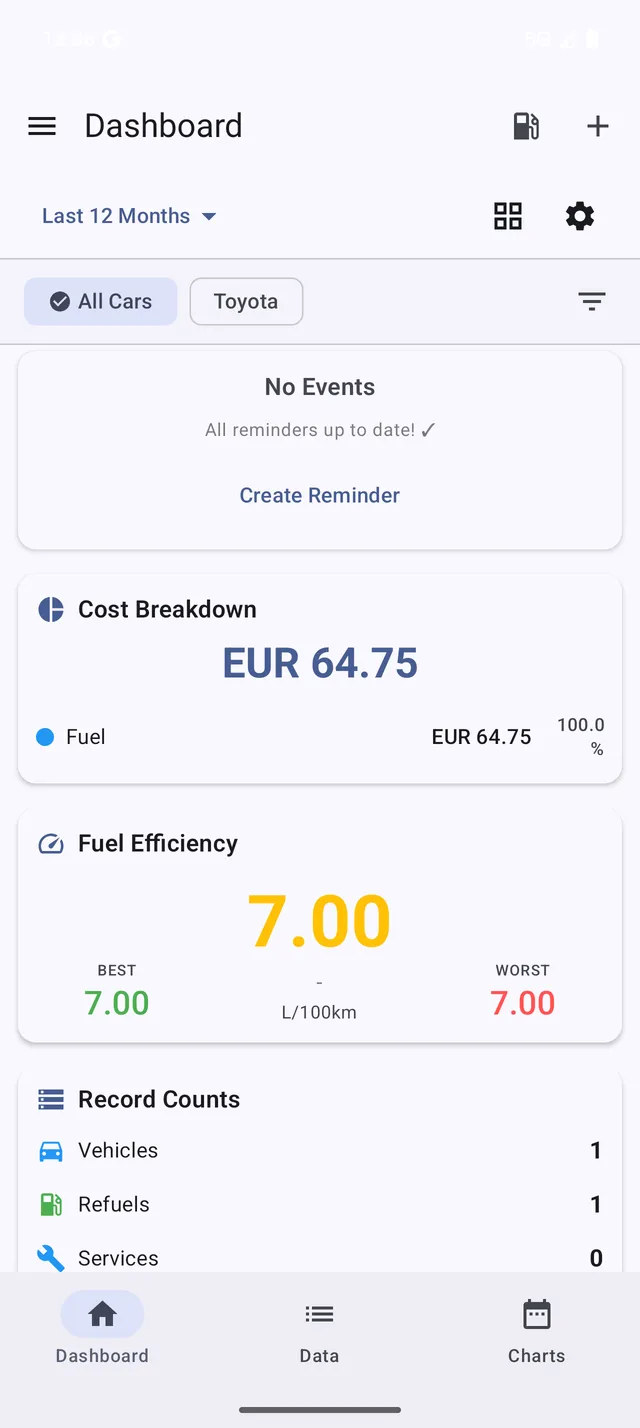 The My Cars dashboard shows your vehicle’s key statistics at a glance
What You’ll Learn
This guide series covers everything you need to get started:
- Welcome (this guide) - Overview of features
- Adding Your First Vehicle - Set up your car in the app
- Recording Your First Refuel - Track fuel consumption
- Understanding Your Statistics - Read charts and insights
- Setting Up Backup - Protect your data
App Features at a Glance
Track Everything
- Refuels - Monitor fuel consumption and efficiency
- Services - Log maintenance work and costs
- Bills - Track insurance, taxes, parking, and more
- Trips - Record business and private mileage
Stay Organized
- Reminders - Get notified about upcoming services
- Statistics - View beautiful charts and trends
- Multi-vehicle - Manage all your vehicles in one place
Protect Your Data
- Local Backup - Export to your device
- Cloud Backup - Sync with Dropbox, Google Drive, or OneDrive (subscription required)
Subscription Tiers
My Cars is free to use with core features. Optional subscriptions unlock more:
Free (Always Available)
- Unlimited vehicles and records
- Charts and reports
- Reminders
- Basic widgets
- Local backup
PRO Subscription
Everything in Free, plus:
- Dropbox cloud backup
- Search across all records
- Budget tracking
- Data export (CSV/PDF)
- PRO widgets
- Hours/distance tracking
PRO+ Subscription
Everything in PRO, plus:
- Google Drive & OneDrive backup
- Intelligent Insights dashboard
- Total Cost of Ownership analysis
- Tax & business reports
- Budget category breakdown
- Advanced widgets
You can use the free version indefinitely. Upgrade anytime from Menu > Compare Plans.
Ready to Begin?
Let’s add your first vehicle in the next guide.