Electric, Hybrid & Alternative Fuels
Track electric, hybrid, plug-in hybrid (PHEV), LPG, CNG, and dual-fuel (bi-fuel) vehicles in My Cars
Does My Cars support electric vehicles?
Yes. My Cars isn’t just for petrol and diesel cars — it tracks electric, hybrid, plug-in hybrid (PHEV), LPG, CNG, ethanol/flex-fuel and dual-fuel vehicles. You set the fuel type when you add a vehicle, and the app adapts its units and calculations to match.
How do I set my vehicle’s fuel type?
- Add or edit a vehicle (Menu > Vehicles)
- Choose the Fuel type that matches your car
- Save
From then on, your refuels (or charges) and efficiency figures use the right units for that fuel.
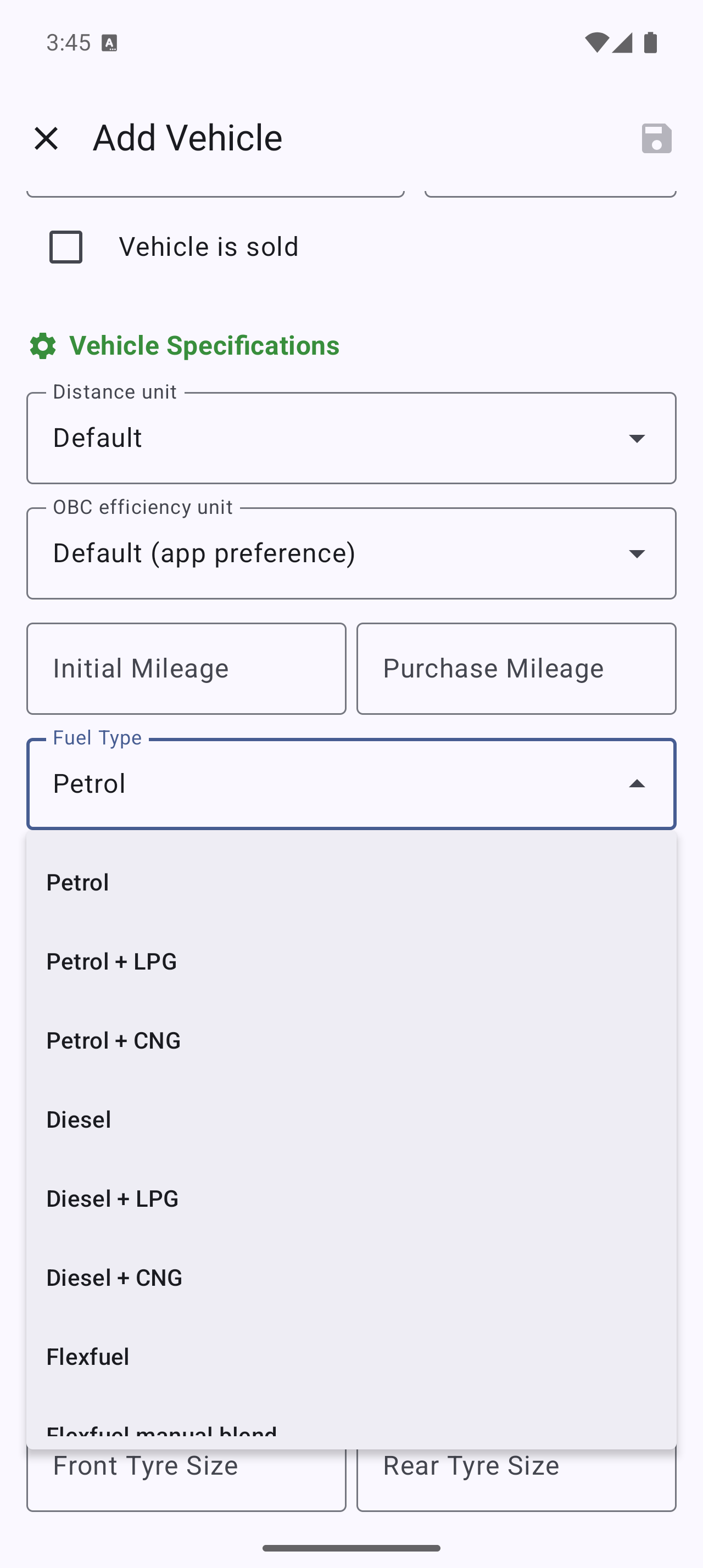
Tracking an electric car (EV)
For electric vehicles, log your charges the same way you’d log a refuel — the energy you added (in kWh) and what it cost. Efficiency is shown in electric units such as:
- kWh/100km or kWh/100mi — energy used per distance
- kWh/h — for time-based usage
This lets you see your real running cost per kilometre or mile, just like fuel efficiency for a combustion car.
Tracking a hybrid
Hybrids that run on petrol (or diesel) are tracked like a combustion car — log your fuel-ups and the app reports fuel efficiency and costs. Set the fuel type to Hybrid or Diesel hybrid.
If your vehicle also charges from the grid, it’s a plug-in hybrid — see the next section instead.
Tracking a plug-in hybrid (PHEV)
Plug-in hybrids are a first-class fuel type in My Cars. Set your vehicle to Plug-in hybrid (PHEV) or Plug-in hybrid (diesel) — not Hybrid, and not a dual-fuel gas option. Both entries are near the bottom of the Fuel type list, so scroll down.
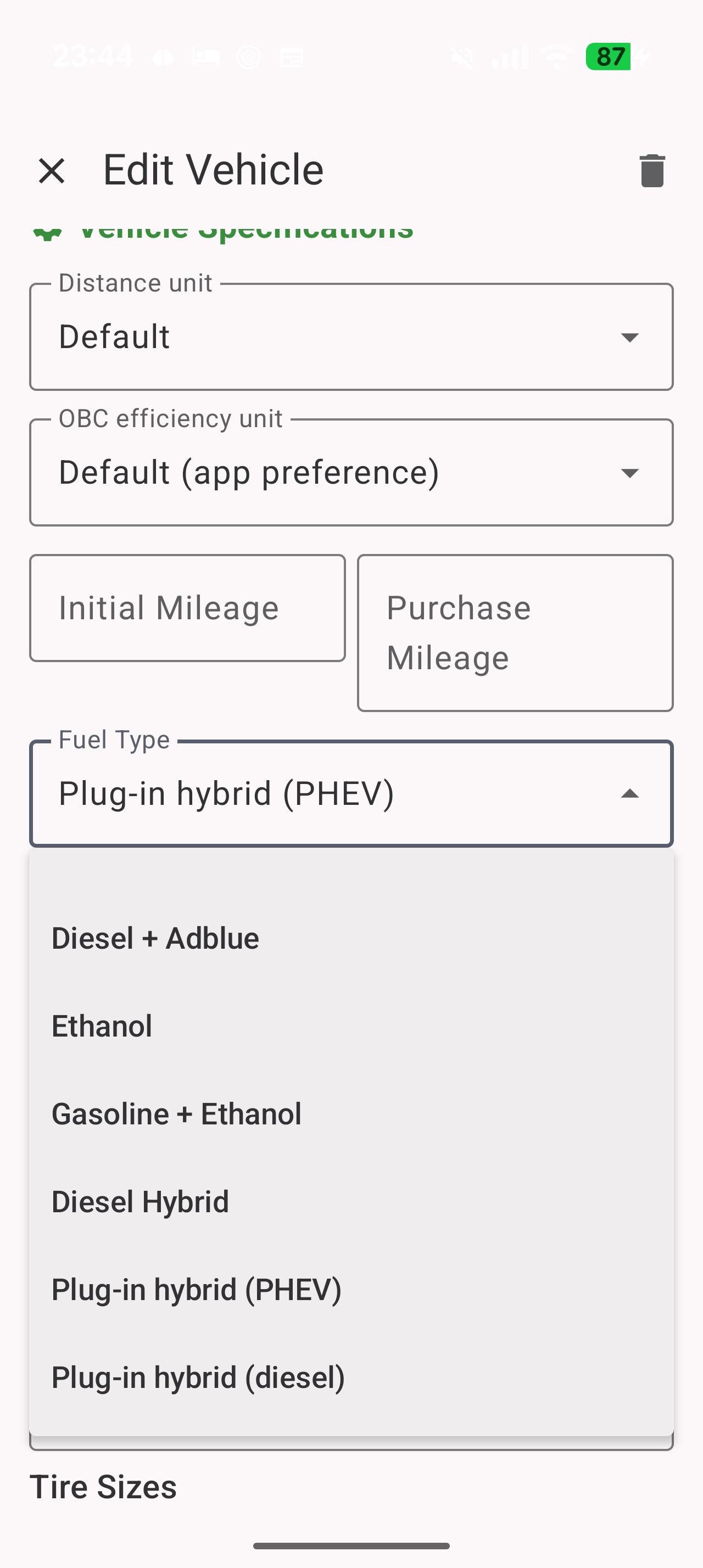
Then log everything on the same vehicle:
- Fuel-ups — quantity, price, and refuel type, as usual
- Charges — the energy you added (in kWh) and what it cost
Get separate petrol and electric efficiency
Once the vehicle is set to PHEV, every refuel and charge gains an extra field: Electric distance.
Enter how many kilometres (or miles) of that entry’s stretch you drove on battery. The app shows the percentage as you type (e.g. “= 50% electric”). From that, it works out:
- L/100km (or MPG) over the kilometres you actually drove on petrol
- kWh/100km over the kilometres you actually drove on battery
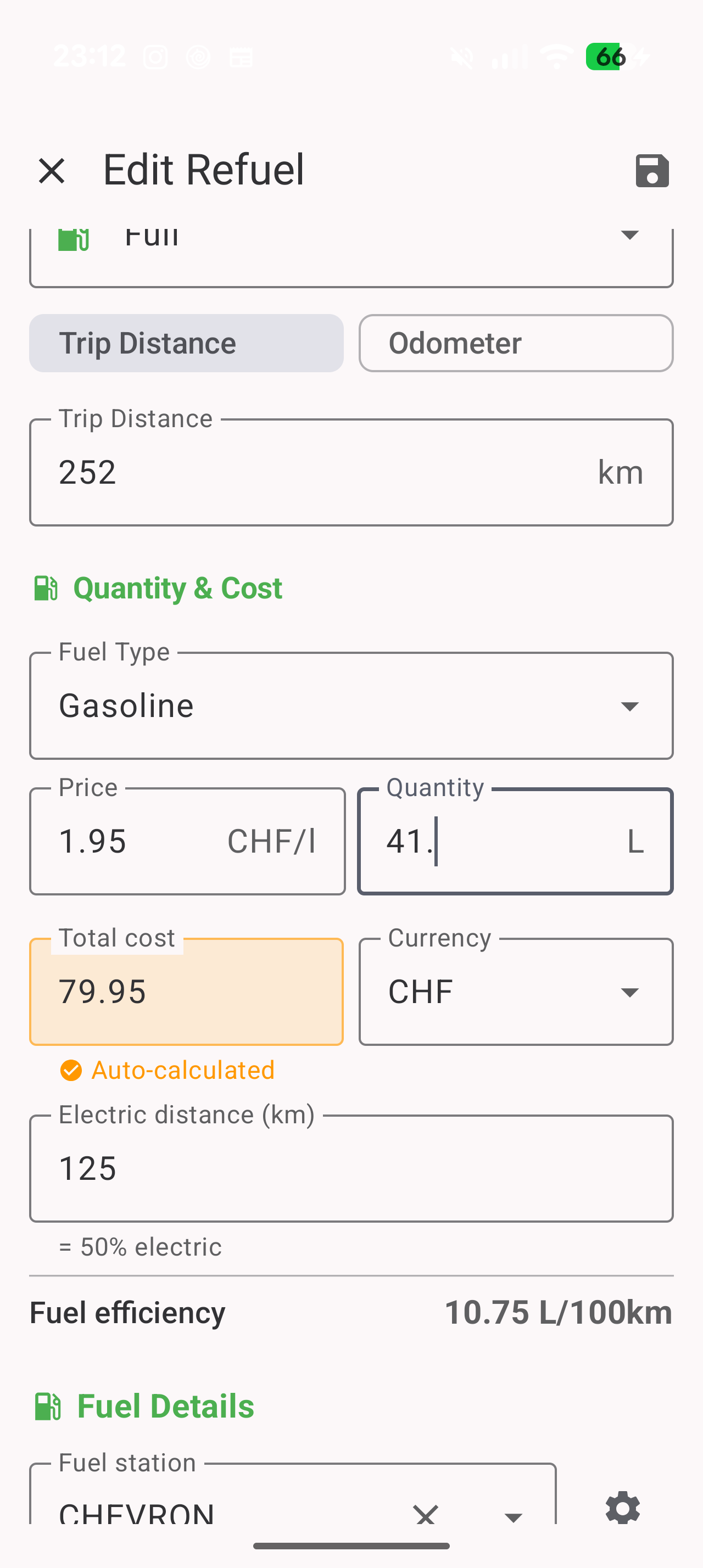
Without this field, both figures are still calculated, but they’re spread over your total driving — so your petrol consumption looks unusually low and your electric consumption looks unusually high. That’s a valid way to read it (fuel used per 100 km of all driving), it just isn’t the engine’s real thirst.
You can also add the Electric vs Engine card to your Dashboard to see the split over time.
Why does my petrol fill show only a few kilometres?
This is the most common PHEV question, and the numbers are correct — they’re just two different things.
In the Data list, each refuel shows two numbers: trip / odometer. The first is the distance since the previous entry, whatever its type. So if you charged this morning and filled up with petrol this afternoon, that fill shows only the few kilometres since the charge.
Your fuel efficiency does not use that number. It’s calculated over the whole distance since your last petrol fill, with the charges in between counted in. The kilometres are all there — they’re just not printed on that one row.
The same applies in reverse: a charge’s kWh/100km covers the distance since your last charge.
Check this one setting
On version 3.10.1 and earlier you need to set this yourself. Newer versions handle it for you: hybrids and plug-in hybrids always measure each fuel from its own previous fill, whatever this setting says — charging isn’t a fuel switch, so the choice never really applied to them. Affected entries are corrected automatically the first time you open the app after updating.
Settings > Advanced > Efficiency Algorithms > Bi-fuel
- same refuel type — each fuel is measured from its own previous fill. This is the right choice for hybrids and PHEVs, and the default for new installs.
- on last car refuel — every entry is measured from the previous entry, whatever the fuel. On a plug-in hybrid this makes your petrol consumption jump to impossible values after a charge.
If you installed My Cars before version 3.5 you may still be on on last car refuel. Switch it to same refuel type — your existing entries are recalculated automatically.
If you enter trip distance rather than the odometer
Check which mode you’re in under Settings > Data Entry > Refuel distance:
- Odometer — you type the reading from your dashboard, and the app works out the rest. Simplest for plug-in hybrids.
- Trip — you type the distance yourself. It must be measured from the previous entry, even if that was a charge — not from your last petrol fill. Otherwise the same kilometres are counted twice and your total odometer drifts above the real one.
Tracking LPG and CNG
LPG (autogas) and CNG (compressed natural gas) are fully supported, including the appropriate units:
- LPG is measured in litres (or gallons), like liquid fuel
- CNG is measured by volume (e.g. m³/100km, m³/100mi)
Set the vehicle’s fuel type accordingly and log each fill-up as usual.
Tracking a dual-fuel (bi-fuel) vehicle
If your car runs on two fuels — for example petrol + LPG, or petrol + CNG — My Cars can track both. A bi-fuel vehicle has two tanks, and each refuel lets you record the quantity and price for the fuel you actually filled.
- Record a petrol fill and an LPG fill independently
- See costs and efficiency for each fuel
Choosing how efficiency is calculated
Under Settings > Advanced > Efficiency Algorithms > Bi-fuel you choose how the distance for each reading is measured:
- same refuel type — each fuel is measured from its own previous fill. Right if you switch fuels manually and run one tank down before flipping to the other.
- on last car refuel — each reading is measured from the previous entry, whatever the fuel. This gives you fuel used per 100 km of total driving. Right if your LPG/CNG system switches automatically and you can’t tell where one fuel stopped and the other started.
Hybrids and plug-in hybrids ignore this setting in newer versions — they always measure each fuel from its own previous fill. On 3.10.1 and earlier, choose same refuel type yourself.
Your CO₂ savings (trees saved)
If you drive an electric or plug-in hybrid vehicle, the Dashboard can show how much CO₂ you’ve avoided compared with an equivalent petrol car. Add the CO₂ Savings card to your Dashboard — it’s free, in the Summary group — and it shows:
- CO₂ saved — kilograms of CO₂ avoided over the selected period
- Distance driven on electric power, and your real efficiency (kWh/100km)
- ≈ N trees — your savings expressed as the number of trees needed to absorb that much CO₂ in a year
- Lifetime total — your all-time CO₂ saved
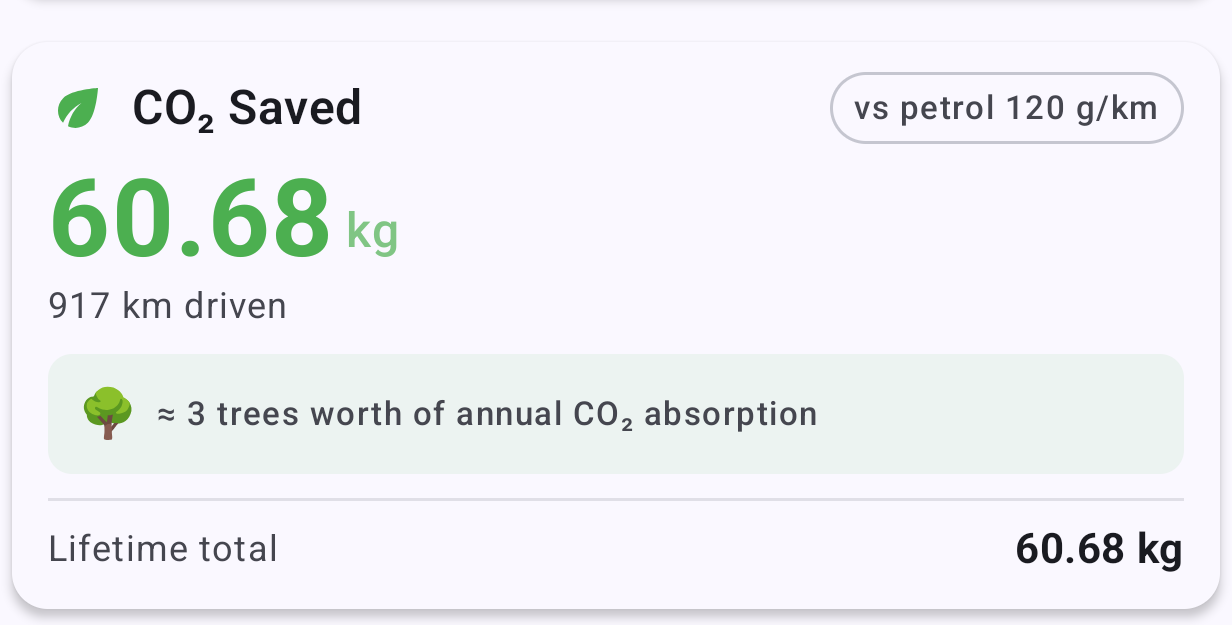
The card appears once you’ve logged some electric charges. For petrol or diesel vehicles it stays hidden — it shows “Available for electric and plug-in hybrid vehicles.”
How is it calculated?
My Cars uses your actual EV efficiency (from your logged charges) and your region’s grid carbon intensity to estimate real EV emissions, then compares that to a reference petrol car:
- Grid carbon intensity (g CO₂/kWh) — auto-detected from your region; adjust it to match your local electricity mix
- ICE car reference (g CO₂/km) — the petrol car you’re comparing against (the EU fleet average is 120)
Both are adjustable under CO₂ Calculation Settings, so the figure reflects how and where you actually charge.
Which fuel types are supported?
My Cars supports, among others:
- Petrol / Gasoline
- Diesel
- Electric
- Hybrid (petrol + electric) and diesel hybrid
- Plug-in hybrid — PHEV (petrol) and PHEV (diesel)
- LPG (autogas)
- CNG
- Ethanol / flex-fuel
- AdBlue (as an additive expense)
- Dual-fuel / bi-fuel (two-tank) vehicles
You can also customize fuel subtypes and octane grades to match what’s sold in your region.