Fuel Stations
Managing fuel stations, capturing locations, tracking prices, and finding the best deals
What are Fuel Stations?
The Fuel Stations feature lets you:
- Save the stations you use
- Optionally pin each station’s location on the map
- Track prices at different stations
- Compare costs across stations
- Apply loyalty discounts automatically (PRO+)
How do I add a fuel station?
When recording a refuel:
- Tap the Station field
- Tap Add new station
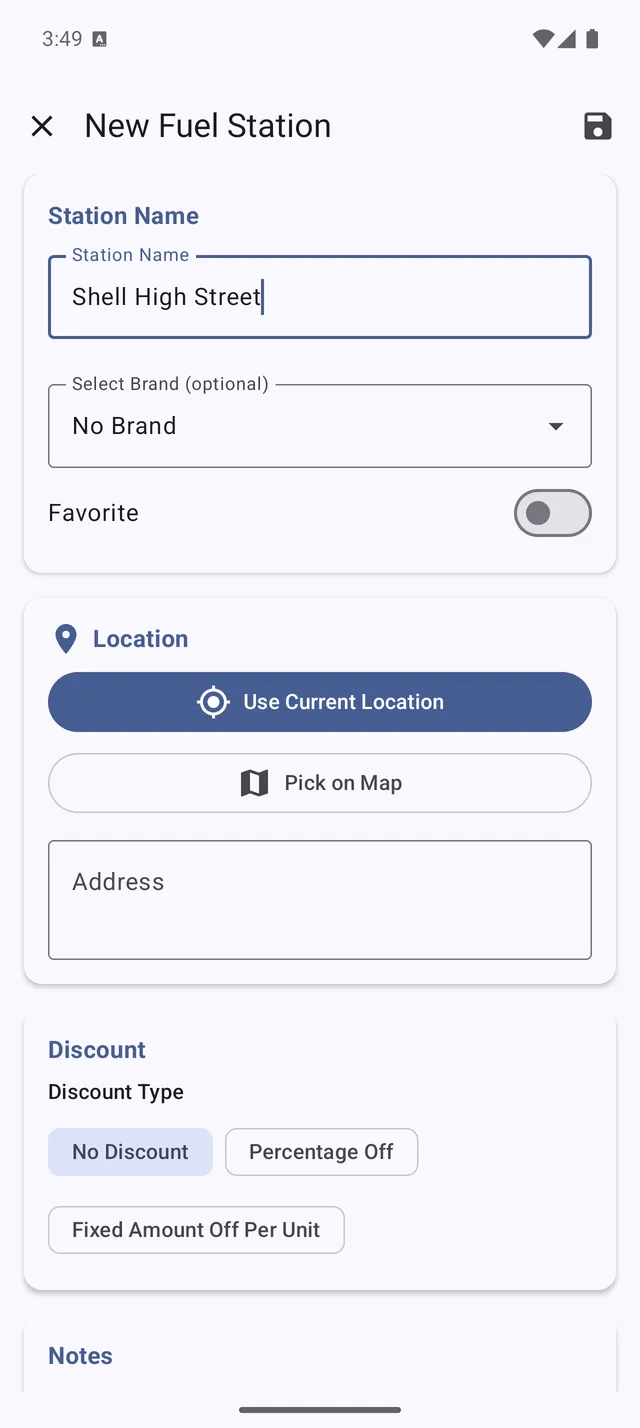
- Enter the details:
- Name — station name or brand
- Location — optional (see below)
- Brand — fuel brand (optional, PRO+)
- Tap Save
From the Stations list:
- Go to Menu > Fuel Stations
- Tap the + button
- Enter the station details
- Tap Save
How does the station location work?
Adding a location is optional — a station only needs a name. If you do add one, you have two ways:
- Use current location — tap to capture your phone’s GPS position while you’re at the station. This is the easiest way to map a station accurately.
- Type it in — enter an address, cross-streets, or coordinates by hand.
Locations help you tell similar stations apart and unlock distance-based sorting (below).
Is location permission required? No — you can save and use stations without it. Granting location permission only adds two conveniences: the Use current location button and sorting stations by distance. You can decline the permission and keep using everything else.
Can I sort stations by distance?
Yes. In the Fuel Stations list, if you’ve granted location permission, your stations can be sorted by distance from where you are — handy for finding the nearest one you’ve saved. Without the permission, the list still works; it just won’t sort by distance.
How do I select a station when refueling?
- When recording a refuel, tap the Station field
- Choose from your saved stations
- The station is linked to that refuel
This helps track which stations offer the best prices.
How do I view station statistics?
- Go to Menu > Fuel Stations
- Tap on any station to see:
- Total refuels at this station
- Average price paid
- Last visit date
- Price history over time
Can I track fuel station brands? (PRO+)
With PRO+, you can manage fuel brands:
- Go to Menu > Fuel Stations > Brands
- Add brands like Shell, BP, Esso, etc.
- Assign stations to brands
- Set default discounts per brand
When you refuel at a branded station, discounts apply automatically.
How do loyalty discounts work? (PRO+)
If you have loyalty cards with fuel brands:
- Go to Menu > Fuel Stations > Brands
- Select or create the brand
- Enter your Default discount (e.g., 3 cents/liter)
- Assign your stations to this brand
When recording refuels at those stations, the discount is applied to your effective price.
How do I compare station prices?
To see price comparisons:
- Go to Menu > Charts
- Select Fuel Price Analysis (or Station Price Comparison)
- View average prices by station
This shows which stations consistently offer better prices.
How do I edit or delete a station?
- Go to Menu > Fuel Stations
- Tap on the station
- Tap Edit to modify details
- Or tap Delete to remove it
Note: Deleting a station doesn’t delete the refuels recorded there.
How many stations can I save?
There’s no limit to saved stations. Save as many as you regularly use.
For easier management with many stations:
- Use consistent naming
- Add a location to tell similar stations apart
- Group by brand (PRO+)