Tires & Parts
Tire sets, seasonal swaps, tread depth, engine oil, part changes and their reminders
Do I need PRO for Tires & parts?
Yes. PRO includes the garage with up to 2 tire sets per car; PRO+ removes the limit and tracks the front and rear tire pairs separately. On the free plan, Vehicles > ⋮ > Tires & parts shows an example of what it looks like.
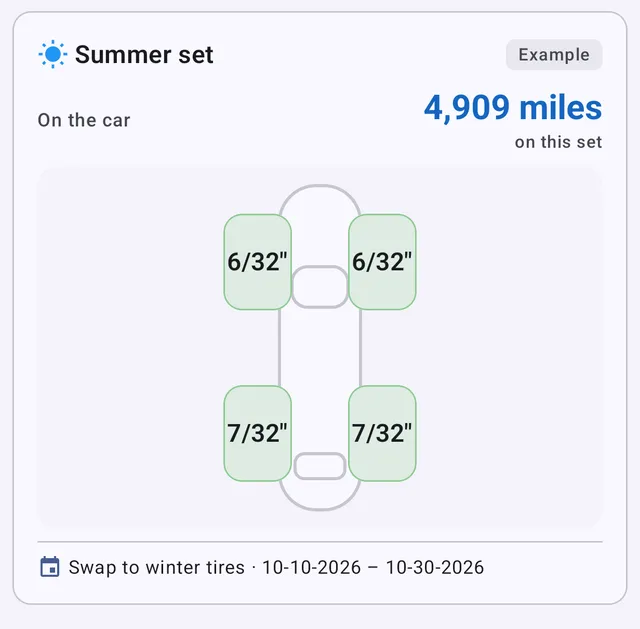 What the garage looks like, shown before you subscribe
Why isn’t “Tires & parts” in my menu?
The menu entry appears once you’ve added your first tire set or part, so it doesn’t take space if you don’t use it. Until then, open it from your car’s card: Vehicles > ⋮ > Tires & parts.
How does the app know when I should swap to winter tires?
From the swaps you log. After your first swaps, My Cars learns the weeks you usually swap in and shows the window on the dashboard and in the garage, e.g. Swap to winter tires · 10-14-2026 – 11-07-2026, with a notification when it opens. Log each swap with Swap so the window stays accurate.
Can I set my own swap dates instead?
Yes. Go to Settings > Notifications > Seasonal tire swaps and set To winter tires and To summer tires, each with a From and Until day. Your dates apply to all your cars and take the place of the learned window — the reminder then says set in Settings. Tap Clear to go back to learning from your swaps. The entry appears once a car has a summer or winter set.
How do I stop the swap reminder for one car?
In Reminders, tap Turn off on that car’s swap card and confirm. Only that car stops getting swap reminders. You can turn them back on only right after, with Undo on the message at the bottom. To skip just this season, tap Not this season instead.
Why can’t I save a swap?
A swap can’t be dated before the set was last fitted or taken off, or at a lower mileage — the distance on each set would run backwards. The dialog names the event it clashes with. If that older event was wrong, open the set’s History and use Correct mileage.
Is tread shown in millimetres or 32nds?
It follows your units: millimetres with kilometres, 32nds of an inch with miles. You can enter each wheel separately; uneven wear is coloured on the car diagram.
How does it know how long my tires will last?
After two tread readings, it works out how fast the tread wears for the distance you drive and shows how far the set can still go — ~1,717 miles left at your wear rate. A stored set that may not last its next season is flagged may not last the season before you fit it.
I have PRO and want to add a third tire set. What happens?
PRO holds 2 tire sets per car. When you add a third, My Cars asks Which set are the new tires replacing?: they take its place, and the old set is retired with its history when you save — backing out changes nothing. PRO+ has no limit.
Can I replace only two tires?
Yes, with PRO+: Replace tires > 2 tires replaces just the pair that wore out. If the front tires wore out, My Cars asks Where do the new tires go? and recommends On the rear (recommended) — the rear tires move to the front. Each pair keeps its own brand, fitting date and distance. When you add a tire set, the link Only 2 new tires? Replace a pair on their set leads to the same place. With PRO, Replace tires > All 4 tires replaces the whole set.
What’s the difference between a part I keep and a part I replace?
- I fit it and keep it — a roof box, a bike rack, a dash cam: it goes in Equipment, either on the car or in storage, and you can sell or retire it.
- I replace it when it wears out — a timing belt, snow chains you wear out: it goes in Service items, and each change is a new entry that lasts until the next one.
The listed parts already know where they belong: engine oil, filters, brake pads, the battery, alternator and starter are service items. For your own parts (+ > Something else…) you choose once, when you add it.
How do I record that the roof box is on the car (or off again)?
Flip the switch on its row in the car’s garage. A message confirms it with Undo and Change date if it happened on another day. For a battery or other service item you take off without replacing, open it and tap Take off and store — Put on the car fits it again.
I picked the wrong one for my custom part. Can I change it?
Not on the existing part, because its history depends on it. Add it again as a new part with the right choice. Deleting the old one also deletes its history, so keep it if you want that record.
Should I delete tires or equipment I no longer have?
Usually not: deleting also deletes its history. Open it, tap the pencil, fill in Sold or disposed of if you sold it, and tap Mark as sold / disposed. It moves to Retired and keeps its history, and the sale price is subtracted from your running costs. Delete only an entry you added by mistake.
How do I get reminded about my next oil change?
Open the part (or add it), turn on Remind me to change it, and set Every … months or Every … miles — whichever comes first. The part shows Next change in …, then Due in … as the date or distance gets close, and Overdue by … once it’s passed. Due parts show on the dashboard’s Next Event card and in Reminders, with Log change, Remind me later and Stop reminding. The reminder restarts when you log the next change.
Can I record the oil grade and how much went in?
Yes. An oil change has a Grade (tap 0W-20, 5W-30… or type your own), a Spec / approval such as VW 504.00, and a Quantity — in litres, or quarts if you use US gallons. Your next oil change starts filled in from the last one, so you only check it still matches.
How do I log oil I topped up between changes?
Open Engine oil and tap Add oil: the date, the mileage and how much you added. Leave the price empty if the oil came from a bottle you already paid for; a priced top-up counts in your costs.
Why don’t I see my oil use yet?
Oil use is shown once you’ve driven 1,000 km (about 620 miles) since the last oil change — before that, a few top-ups would give a misleading figure. Until then the oil block lists your top-ups since the change.
I logged an oil change late. How do I record the right date and mileage?
In the form, tap Change next to Replaced … at … and enter the day and that day’s mileage. If you don’t know the mileage, leave it empty rather than keeping today’s. You can also fix it later from the part’s History or Edit.
Are my tires and parts in my backups?
Yes — tires, parts and oil top-ups are in local backups and in the backup files saved to your cloud storage, and any change in the garage triggers your next automatic backup. When restoring with Smart Merge (PRO), the Tire sets & parts switch lets you include or skip them.
What happens to my garage if my subscription ends?
Nothing is lost. Your tires and parts stay visible, marked View only. Renew to add, swap or record tread again.