Bills & Expenses
Tracking insurance, parking, fines, and recurring expenses
What types of bills can I track?
My Cars includes default bill types:
- Car insurance - Annual or monthly insurance premiums
- Parking - Parking fees and permits
- Car wash - Cleaning expenses
- Fine - Traffic tickets and penalties
- Accessories - Parts, upgrades, and add-ons
You can create custom bill types in Settings > Customize data > Bill types.
How do I record a bill?
- Go to your vehicle’s Events tab
- Tap the + button
- Select Bill
- Choose the bill type (insurance, parking, etc.)
- Enter the details:
- Date - When the expense occurred
- Cost - Amount paid
- Notes - Any additional details
- Tap Save
What are recurring bills?
Recurring bills are expenses that repeat on a schedule, like:
- Monthly insurance payments
- Annual registration fees
- Quarterly parking permits
To create a recurring bill:
- When adding a bill, enable the Recurrent option
- Set the frequency (weekly, monthly, yearly)
- Optionally set an end date or number of occurrences
- Save the bill
The app will automatically generate future bills based on your schedule.
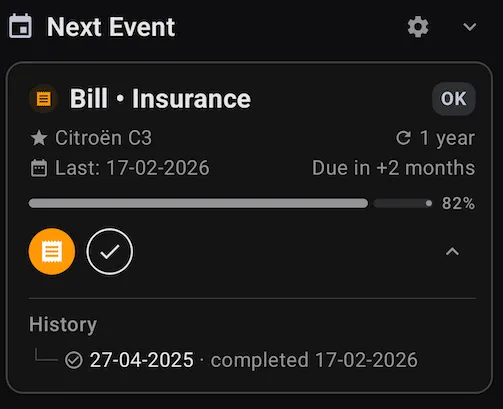 A recurring insurance bill tracked in the Next Event card
How do I manage recurring bills?
Go to Menu > Recurring Bills to:
- View all active, paused, and expired recurring series
- Pause a series to stop generating new bills
- Resume a paused series
- Delete a series (existing bills remain)
Each generated bill can be edited individually without affecting the series.
How do I see my total expenses?
To view expense breakdowns:
- Go to Menu > Charts
- Select Cost pie chart to see bills vs. fuel vs. services
- Or go to Menu > Stats to see total bill counts and amounts
You can filter by date range to see expenses for specific periods.
How do I create custom bill types?
- Go to Menu > Settings > Customize data
- Select Bill types
- Tap + to add a new type
- Enter a name and optional description
- Tap Save
Your custom bill types will appear when adding new bills.